
Sync with your iPhone (iCloud)
About five minutes the first time, because Apple makes you create a special password. After that, with automatic sync on, your changes go to your iPhone about every 6 hours.
First time
1
You’ll need your Apple ID password for this — the one you use for the App Store and iCloud. Don’t remember it? Reset it first at iforgot.apple.com, then come back here.
2
On a computer or your phone, go to appleid.apple.com and sign in. (Apple may text a code to your iPhone — enter it.)
3
Open Sign-In and Security → App-Specific Passwords → tap the + (or “Generate an app-specific password”). Name it “Nimbus” and tap Create.
4
Apple shows a 16-letter password with dashes, like abcd-efgh-ijkl-mnop. Copy it. When you type it into Nimbus, leave the dashes OUT — the real password is just the 16 letters.
5
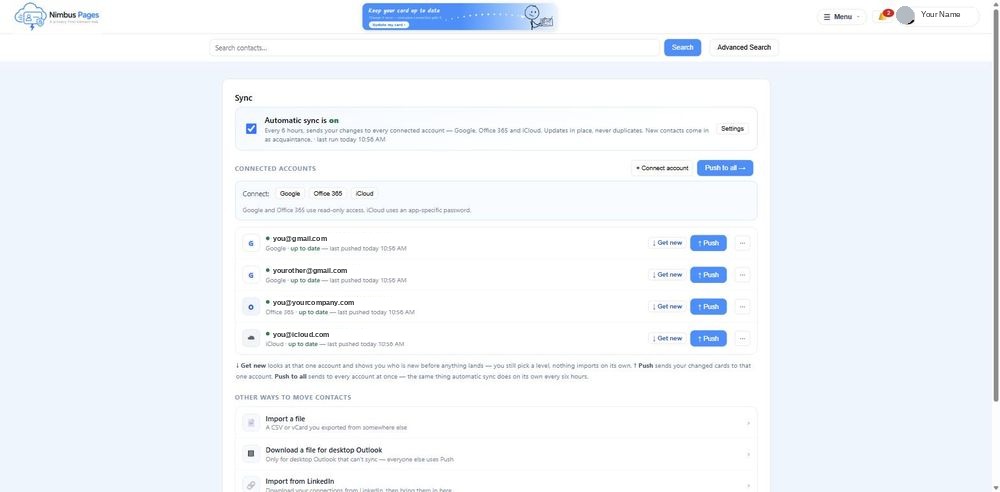
Back in Nimbus, Sync page → the iCloud box: enter your Apple ID email and that password (no dashes) → Connect iCloud.
6
Bring your iPhone contacts in: tap “↓ Get new” on the iCloud row, pick a relationship level (Acquaintance is fine to start) and tap Import. Nothing is saved until you do.
7
Send your card to your iPhone: tap “↑ Push” on the iCloud row. Your Nimbus card wins — a matching iPhone contact is rewritten to match; your photo is kept; nothing is duplicated.
After that
With automatic sync on, your changes go to your iPhone about every 6 hours. New iPhone contacts don’t come in on their own. To bring them in, tap ↓ Get new on your iCloud row in Sync / Import.
Fix a person once on their Nimbus card — it shows up on your iPhone at the next sync.
The app-specific password never expires on its own. If you change your Apple ID password, Apple revokes it — make a new one and Connect again.
If it didn’t work
Connect iCloud says the password is wrong.
Two usual causes: the dashes were typed in (leave them out), or it’s your normal Apple password (it has to be the app-specific one from appleid.apple.com).
I can’t find App-Specific Passwords on appleid.apple.com.
It’s under Sign-In and Security. It only appears when two-factor authentication is on for your Apple ID — Apple requires that first (Settings → your name → Sign-In & Security on the iPhone).
I don’t know my Apple ID password.
iforgot.apple.com resets it from your iPhone or a trusted device. Do that first; everything else waits.
Rather be walked through it?
Sign in at nimbuspages.com → Sync → Help me set up sync. The assistant does these steps with you, one at a time, and waits while you do each one.
Need a hand?
Email support@nimbuspages.com.